 how-to
Poor Chip Evacuation in Milling: Causes and Fixes
Table of Contents
- What Causes Poor Chip Evacuation in Milling Operations
- How to Improve Chip Evacuation in CNC Milling
- CNC Milling Feeds and Speeds Troubleshooting
- Milling Coolant and Chip Removal Strategy
- Deep Pocket Milling Chip Removal Techniques
- Diagnosing Chip Evacuation Failures Before They Damage Your Machine
- When to Replace Tools and Adjust Machine Settings
- Frequently Asked Questions
Last Updated: October 21, 2026
What Causes Poor Chip Evacuation in Milling Operations
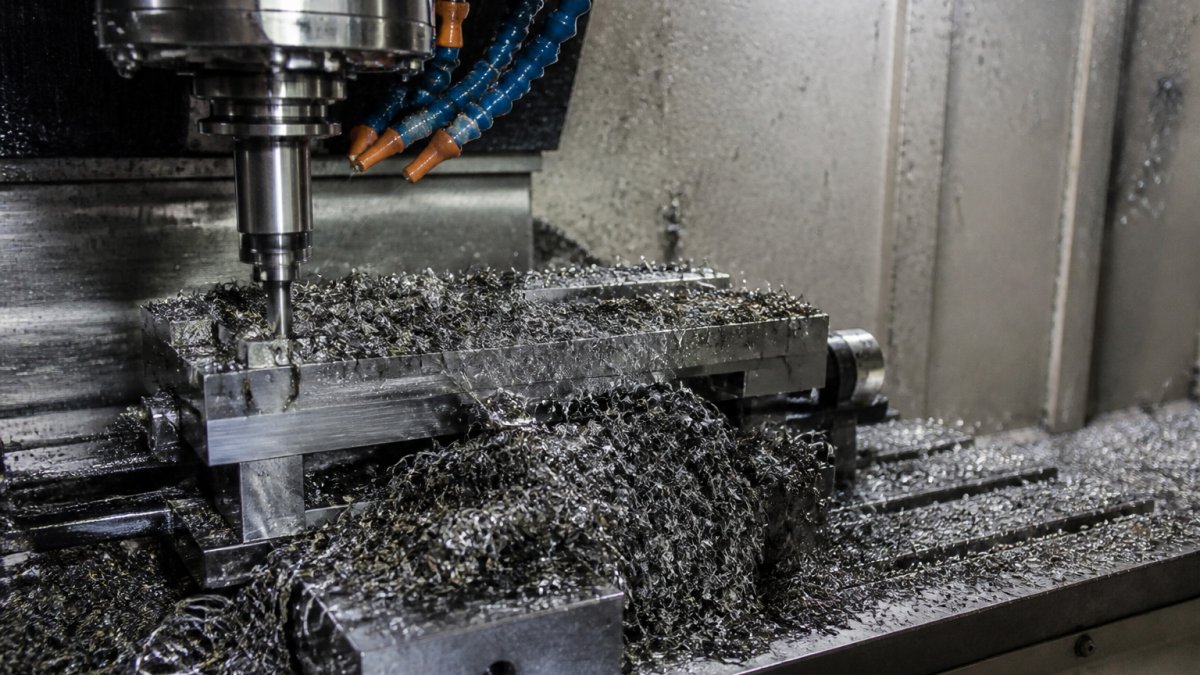
Poor chip evacuation in milling operations occurs when chips become trapped, tangled, or packed around the tool flutes instead of flowing away from the cutting zone, a problem that chip evacuation milling techniques are designed to prevent.
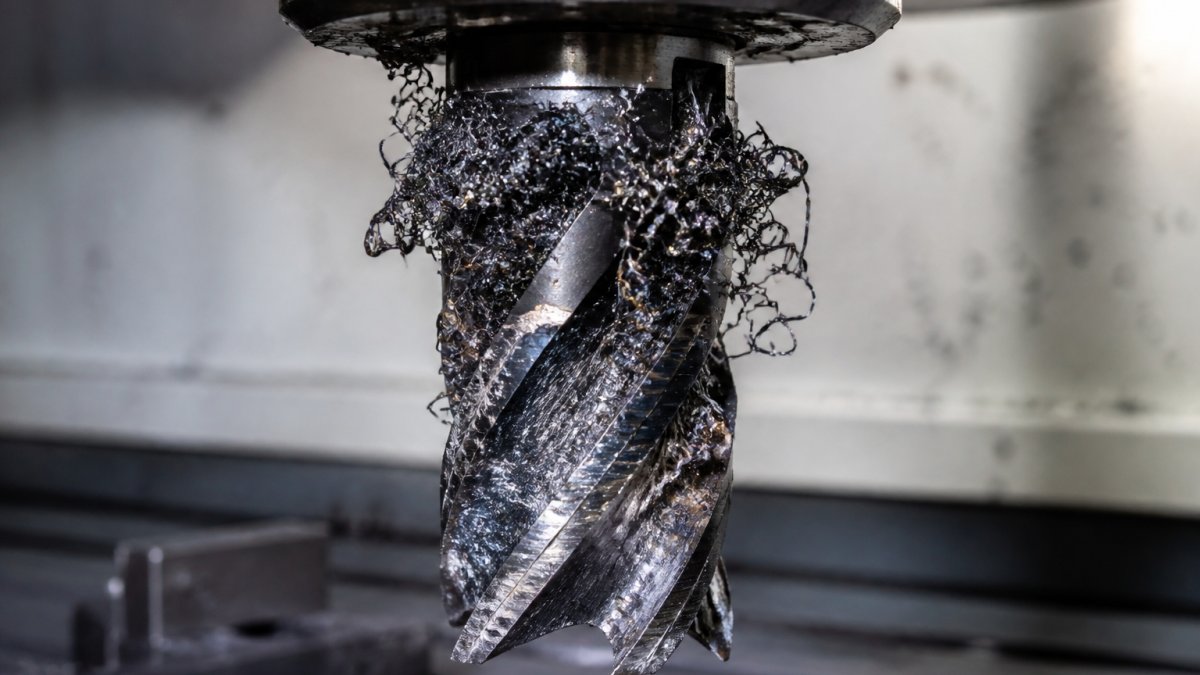
The root causes fall into three categories: tool geometry that doesn't promote chip flow, spindle and feed settings that are out of sync with the tool design, and coolant delivery that's insufficient or poorly directed.
Chip recutting and tool breakage
When chips don't evacuate properly, they recirculate through the cutting zone. The tool recutts the same chip multiple times. Each pass generates heat, work-hardens the material, and dulls the tool edge faster. Eventually, the tool fractures.
You'll notice this as sudden tool breakage with no warning, once recutting starts, the damage happens in seconds.
Look for these signs:
- Chips wrapping around the tool shank or spindle
- Chips packed solid in the flute grooves
- Tool edge showing multiple cutting marks on the same chip
- Rapid temperature rise at the cutting zone
Surface finish defects and dimensional errors
Poor chip evacuation also ruins part quality. Chips trapped in the cutting zone interfere with tool positioning and create inconsistent cutting forces, so the tool deflects, chatters, or produces a wavy surface finish.
Dimensional accuracy suffers because chips physically push the tool off the G-code path, so tolerances drift and parts go out of spec.
Common symptoms:
- Surface finish is rough or wavy instead of smooth
- Parts measure oversized or undersized unpredictably
- Chatter marks visible on the workpiece
- Dimensional variation increases as the tool dulls
How to Improve Chip Evacuation in CNC Milling
Improving chip evacuation milling requires matching three variables: tool geometry, spindle speed, and tool engagement. Get all three aligned, and chips flow cleanly. Misalign any one, and evacuation fails.
Optimize tool geometry and flute design
The tool determines how easily chips escape. Aggressive flute angles and large flute volumes move chips faster; shallow flutes or a tight spiral trap them.
For materials that produce long, stringy chips (aluminum, some steels), use a tool with a higher helix angle and larger flute space.
Check your tool specification sheet for:
- Helix angle (higher angle = better chip flow for most applications)
- Flute volume and geometry
- Chip-breaker design or edge radius
- Recommended speeds and feeds for your material
Many operators use the same tool for every job, a mistake. Match the tool to the material and cut depth; a tool designed for shallow finishing passes won't evacuate chips from a deep pocket.
Adjust spindle speed and tool engagement
Spindle speed and feed rate control how much material the tool removes per revolution. Too low, and the tool generates long, tangled chips that pack easily; too high, and it overheats and dulls fast.
Feed rate (depth of cut per tooth) must balance with speed. High feed with low speed produces thick, difficult chips. Low feed with high speed produces fine dust that can also clog the flutes.
Start with the tool manufacturer's recommended speeds and feeds. Then adjust based on what you observe:
- If chips are long and stringy, increase spindle speed slightly
- If chips are fine dust that packs, reduce feed rate or increase speed
- If the tool chatters, reduce depth of cut or increase speed
- If the tool overheats, reduce speed or reduce feed rate
Most CNC machines allow on-the-fly speed adjustment. Use it. Watch the chip formation and dial in the sweet spot.
CNC Milling Feeds and Speeds Troubleshooting
Feeds and speeds are the most adjustable variables on your machine. Small changes have big effects on chip evacuation and tool life.
Identifying feed rate problems
Feed rate is the distance the tool travels per tooth engagement. Too low, and the tool rubs instead of cuts, generating heat and fine chips that pack. Too high, and it loads up, deflects, and produces thick, difficult chips.
Signs of low feed rate:
- Fine dust instead of visible chips
- Tool overheats rapidly
- Surface finish is burnished or shiny
- Tool dulls quickly without breaking
Signs of high feed rate:
- Thick, long chips that tangle
- Tool chatters or deflects
- Poor surface finish with visible tool marks
- Dimensional variation increases mid-cut
To diagnose, watch the chips as they exit the tool. Ideal chips are tight spirals or C-shaped curls that fall cleanly away; dust clouds or long stringy ribbons mean your feed rate is wrong.
Correcting speed and depth of cut
Depth of cut (axial or radial engagement) controls how much material the tool removes per pass. Shallow depth reduces chip volume but may not engage the tool efficiently.
For poor evacuation problems, start by reducing depth of cut by 25 percent. Make one test pass and observe chip formation. If chips improve, you've found part of the problem.
Then adjust spindle speed.
Make one variable change at a time. Run a test cut. Observe the chips. If they improved, keep the change. If they worsened, revert and try a different adjustment.
Milling Coolant and Chip Removal Strategy
Coolant does two jobs: it cools the tool and it helps flush chips away from the cutting zone. The right coolant strategy can transform chip evacuation from problematic to smooth.
Coolant type selection and delivery
Flood coolant (continuous flow) works well for most milling, carrying chips away and cooling aggressively.
Delivery location matters as much as coolant type.
For most milling, direct coolant to the tool flank or from above the workpiece, letting gravity and the coolant stream carry chips downward and away.
Coolant concentration also affects chip evacuation. Weak coolant (too much water, not enough oil or emulsifier) loses its carrying power. Follow the coolant manufacturer's mix ratio. Check concentration weekly with a refractometer.
Air blast and through-spindle cooling
Through-spindle coolant (delivered through the tool shank or spindle) is highly effective for deep pockets and tight spaces, reaching the cutting zone directly and pushing chips out through the flutes. Many modern CNC mills have this capability.
If your machine has through-spindle cooling, use it for deep cavity work. Set pressure to 50-100 PSI depending on your system. Too much pressure can damage the tool or workpiece. Too little won't evacuate chips.
Air blast alone is insufficient for heavy milling but works for light finishing and chip clearing between passes.
Deep Pocket Milling Chip Removal Techniques
Deep pockets present the hardest chip evacuation challenge. The tool is buried, coolant access is limited, and chips have nowhere to go but up and out through the narrow flute opening.
Step-down strategies and chip breaking
Roughing a deep pocket with one aggressive pass is almost guaranteed to fail. Chips pack, the tool breaks, and you've wasted time and material.
Each pass should remove no more than 25 to 50 percent of the pocket depth, limiting chip volume, allowing better evacuation, and keeping tool load manageable.
Between passes, retract the tool fully and let the machine clear chips.
Some tools include chip-breaker geometry that curls chips tightly and limits their length. If your tool has this feature, it's designed to help evacuation.
Manual chip evacuation and tool retraction
For very deep pockets or sticky materials, manual intervention helps. Stop the machine mid-cut and retract the tool. Use compressed air or a brush to clear chips from the pocket. Resume cutting.
This sounds crude, but it works. You're trading a few seconds of cycle time for reliable tool life and part quality.
Some shops use a chip auger or chip conveyor to move chips away from the cutting area. If your machine has one, keep it running. It prevents chips from recirculating.
Document which pockets require manual clearing. Use that information to refine your step-down strategy or tool selection for the next run.
Diagnosing Chip Evacuation Failures Before They Damage Your Machine
Early detection prevents catastrophic failure. Learn to recognize the warning signs and act before the tool breaks or the part is ruined.
Visual inspection and chip morphology
Chip shape tells you what's happening at the cutting zone.
Stop the machine and inspect chips every few passes during a new job or tool change. Spend 30 seconds looking. It's the fastest diagnostic available.
Also watch for chips wrapped around the spindle, the tool holder, or the workpiece. These indicate the tool is not evacuating chips at all. Stop immediately and correct the problem before the tool breaks.
Color of the chip indicates temperature. Bright chips are normal. Dark blue or black chips mean the tool is overheating. This often signals poor evacuation combined with inadequate coolant.
Pressure and temperature monitoring
Modern CNC machines can log spindle current draw and coolant temperature. Current rises when the tool is loaded or dull; temperature rises when coolant isn't doing its job.
Check these values at the start of a job and periodically during production. If spindle current climbs steadily, the tool is dulling or chip evacuation is degrading.
Many machines alert you to high spindle load or high coolant temperature. Don't ignore these alerts, they flag a problem before it becomes catastrophic.
If your machine doesn't have built-in monitoring, you can feel the vibration and hear the sound. A machine cutting smoothly is nearly silent.
When to Replace Tools and Adjust Machine Settings
Knowing when to replace a tool versus when to adjust settings saves money and prevents waste.
Replace the tool if:
- Edge is visibly chipped or broken
- Tool is dull (cutting force is very high, finish is poor)
- Recutting damage is visible on the flutes
- Tool has been used beyond the recommended life
Adjust settings if:
- Chips are long and stringy (increase speed)
- Chips are fine dust (reduce feed or increase speed)
- Chips are packing in the flutes (reduce depth of cut, improve coolant delivery)
- Tool is overheating (reduce speed, increase coolant flow)
- Surface finish is poor but the tool edge looks sharp (adjust feed or speed)
Many operators replace tools too often, a dull tool can often be salvaged by adjusting feeds and speeds. Others run tools too long and accept poor part quality.
Machine Tool Science offers spindle rebuilds and precision calibration services. When you've optimized your tool strategy and feeds and speeds but still see poor chip evacuation, misalignment or spindle runout may be the hidden cause.
Poor chip evacuation in milling operations stems from mismatches between tool geometry, spindle speed, feed rate, and coolant delivery.
Frequently Asked Questions
How can you tell if chips are recutting during milling?
Recutting chips produce a distinctive pattern: jagged, discolored chip fragments that return to the cutting edge, rough surface finish on the workpiece, and rapid tool wear. Listen for a grinding or chattering sound. If you see long, stringy chips wrapping around the tool or accumulating in the pocket without clearing, recutting is occurring. Stop the program immediately and reduce feed rate or increase spindle speed to break chips into smaller, evacuable pieces.
What is the best way to clear chips from a milling pocket?
Use G-code retraction cycles to lift the tool periodically during deep pocket milling, allowing chips to fall from the flutes. Combine this with adequate coolant or air blast directed at the cutting zone. For manual intervention, stop the spindle, use a chip brush or vacuum to remove accumulated chips, then resume. Never use your hands near rotating tools. Optimize tool geometry and feed rates so chips break and evacuate naturally rather than relying on manual clearing during production runs.
Can incorrect feeds and speeds cause chip packing?
Yes. Feed rates that are too slow produce thin, stringy chips that tangle and pack around the tool. Spindle speeds that are too low prevent proper chip breaking. Conversely, excessive depth of cut combined with slow feed creates thick, continuous chips that jam in the pocket. The solution is to balance speed and feed so the chip thickness matches the tool's flute geometry. Consult your tool manufacturer's recommendations for material and tool diameter, then adjust incrementally during a test run.
How does coolant or air blast improve chip removal?
Coolant reduces friction and heat, making chips more brittle and easier to break. It also lubricates the chip's path out of the pocket. Air blast uses compressed air to physically push chips away from the cutting zone and out of the pocket. Through-spindle coolant delivery is most effective for deep pockets because it reaches the tool tip directly. Select coolant type based on your material: flood coolant for steel, mist or air blast for aluminum. Ensure delivery pressure and volume are sufficient for your pocket depth.